



2 Day Advanced Video & Capcut

Course Information
-
Overview
-
Learning Outcomes
-
Who Should Attend
-
Testimonials
-
Trainer's Profile
-
Course Outline
This is a 2-day Advanced Videography & Editing Using Capcut
Leaner’s will understand the fundamental tools of Videography and editing on the Capcut platform.
Topics Covered:
1. Video Production Workflow ®
2. Types of Video Footages (Shot Sizes, A & B-Rolls) ®
3. How to Record Using Mobile Phones ®
4. Shot Sizes & Camera Angles ®
5. Introduction to Editing Styles with Hook
6. Editing to Rhythm (Beats)
7. Advanced Camera Movements
8. Camera Movements With Gimbals
9. Advanced Editing tools in Capcut (Remove Background,Text-to-Speech, Subtitles)
10. Thumbnail Designing using Canva
11. Title Researching
Activities:
2 x Class Filming Activity
2 x Editing Activity
By the end of this workshop, learners will be equipped with:
· The intermediate skills of video editing using Capcut
· The Know-hows to use a gimbal to execute camera movements
"Highly professional and knowledgeable, the trainer provided excellent insights on making effective presentations; an awesome course I would recommend to my colleagues!"
-Norherdawati Binte Samshul Bahri, Singapore Prison Service (2024)
"He is knowledgeable and presents his materials with good examples. He also have hands on experience and tools to support his presentation"
"He is able to explain in a way which is clear for a person who do not have any knowledge on video editing"
"James is very knowledgeable and his pacing of teaching us is just right"
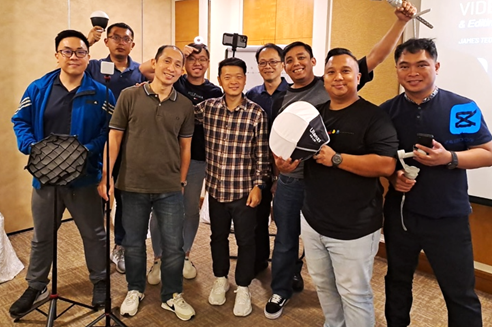

James Teo, Media Skills Trainer
James Teo is a seasoned Media Skills Trainer with over a decade of experience in the creative field. He has worked extensively in photography, video production, and editing, collaborating with both corporate and private companies. After graduating with a Diploma in Video Production, James worked as a corporate communications and marketing executive, specializing in new media for government and private sector companies. He later returned to his passion for food photography, working with nearly 100 brands over eight years, contributing to both print and online media.
James' expertise has led to media features, such as in 8 Days magazine, and interviews with 9.33FM, as well as speaking engagements with local platforms like Carousell. With a certification in Advanced Certificate in Learning and Performance, James combines his passion for creativity with his corporate experience to deliver high-impact training. His courses receive excellent feedback from learners, and he continues to refine his teaching methods to bring more value to each class.
Day 1
|
Time |
Module |
Contents |
Notes |
|
0900-0915 |
Class Introduction & Outline |
ü Trainer and Class Introduction ü Outline of Workshop
|
Lecture-based |
|
0915 - 0945 |
Refresher to Video Production Workflow & Terminology |
ü Contextual Terms Workflow ü Pre-Production ü Production ü Post-Production |
Lecture-based |
|
0945-1030 |
Types of Shot Sizes & Camera Angles
|
ü Shot Sizes ü Camera Angles ü Demonstration |
Lecture-based
|
|
1030-1100 |
Capcut Editing – Part 1 |
ü Application Orientation ü How to Import Video & Audio ü How to Trim & Split ü How to Find Sounds ü How to adjust footages ü How to export into a video |
Technology & Individual learning |
|
1100-1200 |
Advanced Storytelling - Hooks |
ü Examples of Hooks ü Plan an Idea to Film on Padlet ü Class Review on Padlet Ideas |
Individual Exploration Group Learning |
|
LUNCH BREAK | |||
|
1300-1320 |
Editing to Rhythm (Beats) |
ü Examples of Editing to Rhythm |
Lecture-based |
|
1320-1400 |
Capcut Editing 2 – Editing to Rhythm |
ü Introduction to Tools ü Beats & Music ü Demonstration |
Technology-based |
|
1400-1430 |
Activity 1: Edit a 3 minute Video to Rhythm |
ü Editing Activity 1 ü Class Review |
|
|
1430-1530 |
Types of Video Accessories (Audio & Gimbal) |
ü Introduction to Gimbals ü Audio – Microphones Before and After ü Ways to improve audio quality ü Where to get affordable accessories |
Lecture-based & Practical *Learners to be invited to have hands-on using the tools mentioned |
|
1530-1600 |
Advanced Camera Movements with Gimbals |
ü How to use a gimbal with your mobile Phone ü 5 types of Camera Movements ü Executing Camera movement with Gimbals |
Lecture-based & Practical |
|
1600-1645 |
Activity 2– Film all 5 Camera movements with Gimbal |
ü Learners to get into groups to film all 5 camera movements ü Edit all videos into a single video ü Class Review |
Group Learning |
|
1645 |
Brief on Mini Project |
ü Outline of Mini Project Requirements ü Packing up |
|
Day 2
|
Time |
Module |
Contents |
Notes |
|
0900-0915 |
Revision of Day 1 Topics |
ü Trainer and Class Introduction ü Outline of Workshop
|
Lecture-based |
|
0915-1000 |
Capcut Editing 3: Text-to-Speech, Subtitles, Background Removal |
ü Text-to-Speech ü Subtitles & Bilingual Options ü Background Removal ü Exploration Time |
Technology-based
|
|
1000-1030 |
Activity 3: Film a video of yourself speaking about a topic of interest |
ü Learners to film themselves speak to the mobile phone camera |
Individual Learning |
|
1030-1100 |
Editing Activity 3: Talking Head Video |
ü Learners to edit their own videos ü Class Review |
Practical Group Learning |
|
1100 - 1200 |
Thumbnail Designing using Canva |
ü Introduction to Canva Tools ü Demonstration on Canva ü Exploration Time |
Technology-based |
|
LUNCH BREAK | |||
|
1300-1345 |
3-Point Lighting |
ü Introduction to Lightning ü 3-Point Setup ü Types of Lights ü Demonstration |
Lecture-based |
|
1345-1430 |
Lightning Activity |
ü Learners to adjust and film themselves using the lightings |
Individual Learning |
|
1430 - 1545 |
Mini Project Filming & Editing Time |
ü Briefing of Requirements ü Group/Personal Editing Time |
Practical |
|
1545 -1615 |
Mini Project Review |
ü Class Review & Feedback |
Group Learning |
|
1615-1645 |
Kahoot! Quiz |
ü Quiz game to revise concepts taught ü Prize Presentation |
Group Learning |
|
1645-1700 |
Wrap up & Phototaking |
ü End of Workshop Slides ü Photo-taking |
|
